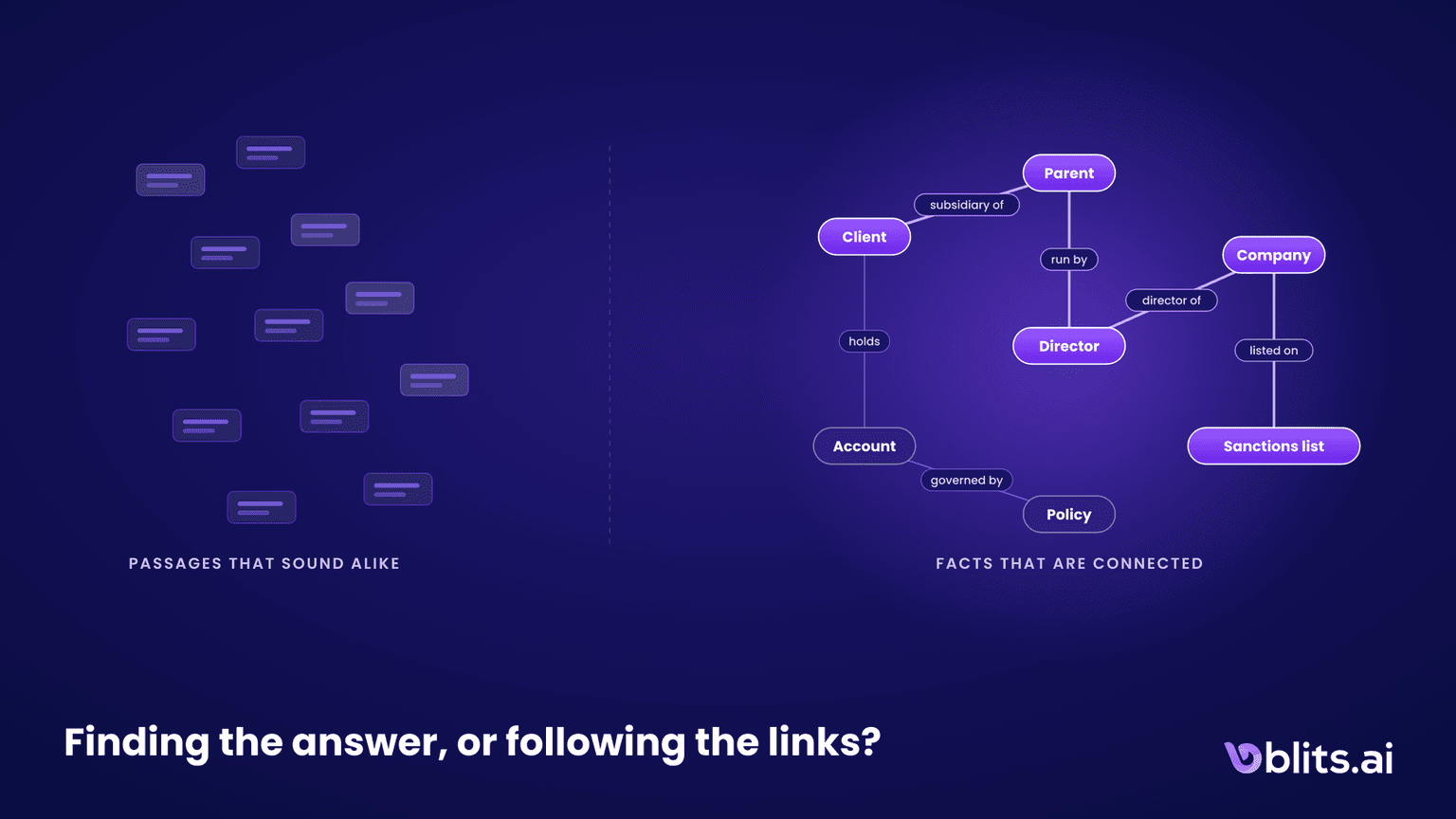
A compliance analyst asks the bank's AI assistant two questions. The first: "What is our policy on politically exposed persons?" The assistant finds the right section of the policy and answers in seconds, with the source. The second: "Which of our corporate clients share a director with a company on a sanctions list?" The assistant returns three paragraphs that mention sanctions and directors, and none of them answers the question.
Same assistant, same documents. The first question is about finding a passage. The second is about following connections. Vector search is built for the first kind, and a knowledge graph is built for the second. Choosing between them, or deciding you need both, starts with knowing which kind of questions your users actually ask.
Vector search turns text into numbers that capture its meaning, so that passages about the same thing end up close together, even when they use different words. Ask "how do I cancel my card" and it finds the paragraph titled "Ending your card agreement". This is the retrieval step in most RAG systems today, and for good reason: it is cheap to set up, it works on documents you already have, and it handles the way people really phrase questions.
It is the right tool when the answer sits in one place. Policies, product terms, procedures, FAQs, manuals, contract clauses. Most questions to an internal assistant or a customer facing chatbot are of this kind, which is why most of the RAG knowledge assistants in our AI Use Case Library are built on it.
Vector search on its own has known weaknesses, such as missing exact codes and burying the best passage too far down the list. Len covered the standard fixes, hybrid search and reranking, in The Many Forms of RAG. Those fixes make vector search better at finding passages. They do not make it understand connections.
A knowledge graph stores facts as entities and the relationships between them. Client A is a subsidiary of Company B. Person C is a director of Company B. Product D is governed by Policy E. When Google launched its Knowledge Graph in 2012, it described the idea in three words: things, not strings. At launch, it held more than 500 million objects and more than 3.5 billion facts about the relationships between them.
The standard data model behind many knowledge graphs, the W3C's RDF, is almost disarmingly simple: a set of triples, each consisting of a subject, a predicate and an object. Person, is director of, company. Everything else is built from that.
The strength of this structure is that you can follow it. Start at a client, step to its directors, step to the other companies they direct, and check each one against a list. A vector index cannot do that, because it does not know that "director" is a relationship between two specific things. It only knows which pieces of text sound alike.
There are three kinds of questions where I see vector search fail.
Questions about connections. "Which suppliers are owned by the same parent?" "Which customers are affected if this product changes?" The answer is not written down in any single passage. It only exists once you combine facts from many documents.
Questions about the whole collection. Microsoft Research put this precisely when it introduced GraphRAG: baseline RAG struggles with queries that require aggregation of information across the dataset to compose an answer. In the accompanying paper, the authors write that RAG fails on global questions directed at an entire text corpus, such as asking for the main themes across a dataset, and report that their graph approach leads to substantial improvements over a conventional RAG baseline in how comprehensive and diverse the answers are.
Questions where more context doesn't help. The tempting fix is to retrieve more passages and let the model sort it out. That works less well than it sounds. Researchers at Stanford found that model performance significantly degrades when models must access relevant information in the middle of long contexts. Adding fifty more chunks often buries the one that mattered.
Vector search finds what sounds like the answer. A knowledge graph finds what is connected to it.
If knowledge graphs are so capable, why isn't everyone using them? Because they come with costs that rarely appear in a conference talk.
A graph needs a model of your domain: which entities exist, which relationships matter, what they are called. That is a design exercise with your business, not a technical setting. Modern approaches like GraphRAG use a language model to create a knowledge graph based on the private dataset automatically, which lowers the effort but adds model cost on every document and introduces extraction errors you then have to find.
Keeping a graph true is a second cost. Directors change, products are withdrawn, policies are replaced. A document index goes stale gracefully: the old passage is still there and still mostly right. A graph with a wrong relationship gives a confident wrong answer. Every graph needs an owner and a process for updates.
A graph is also rigid where language is loose. It answers the questions its structure anticipated very well and the rest poorly. Users rarely ask in the shape of your schema.
The clearest enterprise case is financial crime, where the whole problem is connections. Banks including HSBC, Standard Chartered and Danske Bank use Quantexa, whose core technology is entity resolution on a knowledge graph: working out that five slightly different records are the same person, and then mapping who is linked to whom. In that coverage, an awards judge cited evidence of a 60 percent reduction in case volumes at HSBC. It is an awards citation rather than an audited figure, but the direction makes sense. When alerts are reviewed with the network around them, fewer of them need a full investigation.
Other good fits share the same trait: the value lies in the relationships. Ownership structures for KYC. Product, policy and regulation dependencies, so you know what is affected by a change. Equipment and parts in maintenance. Organizational knowledge of who owns which system and which process.
Before choosing between vector search and a knowledge graph, it is worth asking whether the question needs either.
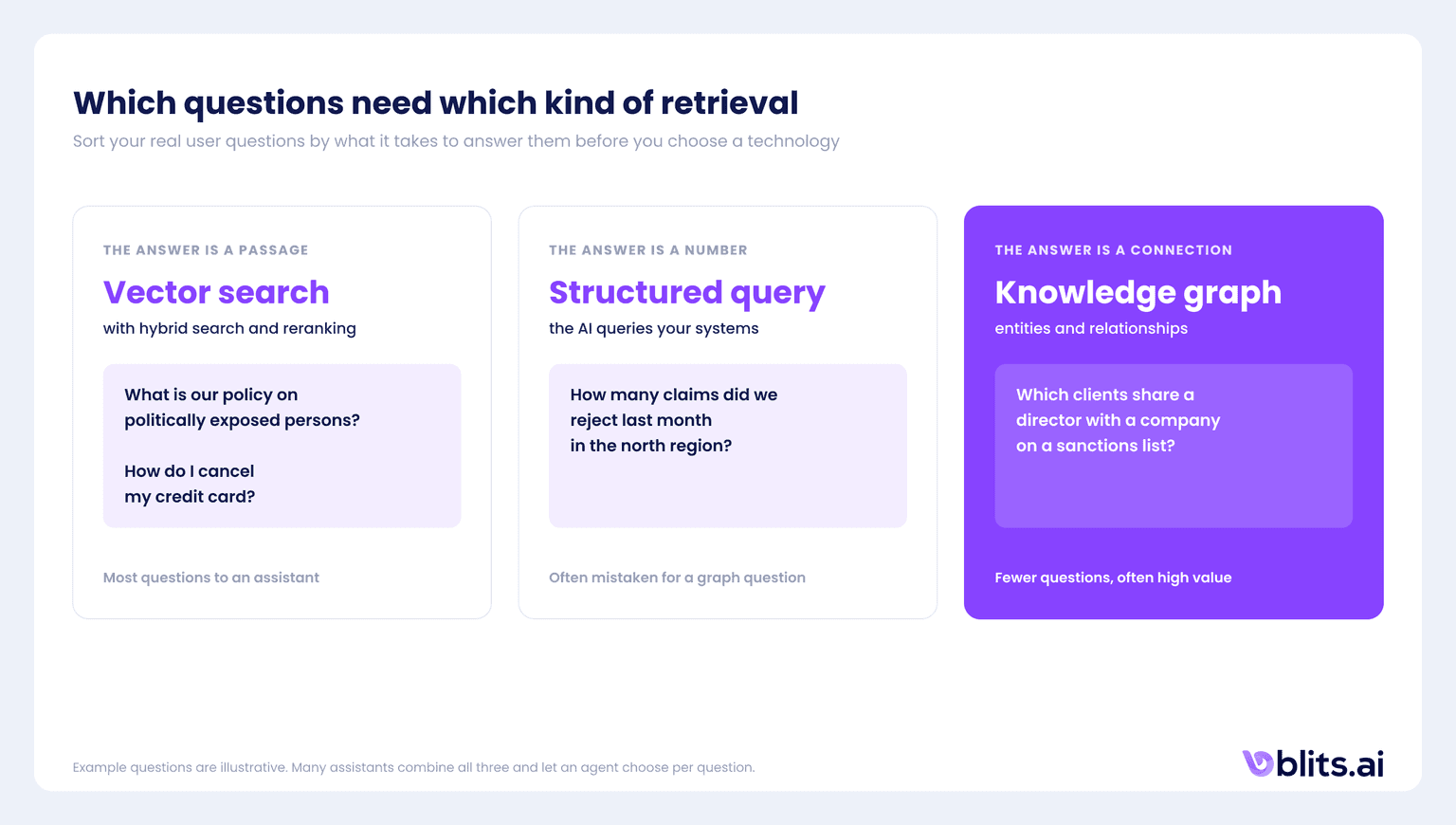
"How many claims did we reject last month in the north region?" is not a retrieval question. The answer sits in a database, and the right approach is to let the AI query that database, with the right permissions, and return a number that someone can check. Neither a vector index nor a graph should be counting things that a database already counts exactly. In our projects, a surprising share of the questions that teams first label as "needs a knowledge graph" turn out to be database questions in disguise.
So the practical picture usually has three parts:
- Vector search, with hybrid search and reranking, for questions answered by a passage in your documents.
- Structured queries for questions answered by numbers and records in your systems.
- A knowledge graph for questions answered by relationships, in the domains where those relationships carry the value.
An agent that can choose between these per question is more useful than any one of them pushed beyond its strengths.
When a customer asks us whether they need a knowledge graph, we don't start with technology. We collect a few hundred real questions from the people who will use the assistant, and sort them by what it takes to answer them: one passage, a number from a system, or a chain of relationships.
In most deployments, the first group is by far the largest, and good vector retrieval covers it. The second group goes to structured queries. If the third group is small, we handle it with a few targeted lookups rather than a full graph. If it is large and valuable, as it often is in compliance, fraud and complex product portfolios, a knowledge graph for that specific domain is worth building, with a clear owner and an update process from day one.
It is less exciting than announcing an enterprise knowledge graph. But it means every component in the system is there because a real question needed it. If you are weighing this choice for your own assistant, the questions are usually where the answer is, and you can look at your questions with us.