The fastest way to make an LLM useful is to give it tools. A model that can only talk makes a nice demo. One that can look up an order is something you can put in production. MCP (Model Context Protocol) servers are how you make that reliable, secure and scalable. This post covers what they are, why they matter and how to switch them on in the Blits.ai platform.
An MCP server is a standardized tool endpoint for LLMs. Without one, you hardcode every tool integration for every model and app. An MCP server exposes a set of tools instead, each with a schema, parameters and a description, and any compatible LLM agent can discover them and call them.
People call MCP a "USB‑C port for tools", and the comparison holds up. The model doesn't need to know how a tool works inside, only one consistent protocol to find tools and call them safely.
Modern LLMs decide by themselves when to call a tool. When a request needs outside data or an action, the model picks the tool whose description and schema fit, produces structured arguments, calls the MCP server, gets a response back and carries on with the conversation. MCP makes that loop the same across providers and tools. One piece of agent logic can call internal APIs, search indexes or custom business systems without a new integration layer each time.
You get one protocol across vendors, models and tools, and you can add or swap a tool without refactoring your agent. Secrets stay on the server side, so your internal APIs are never exposed straight to the LLM. Tool access, logging and access controls sit in one place. The same tool set also serves several assistants on several channels. At scale, this decides whether you end up with a prototype or a platform you can still maintain a year from now.
My bet is that in a few years nobody gets excited about MCP servers anymore, just like nobody gets excited about HTTP. As models get smarter, the value moves from raw intelligence to reliable orchestration, governance and control over context. I expect MCP servers to grow into standardized trust hubs, the place that decides which model may use which tool, what data flows where and where execution has to stop. That makes AI safer and easier to combine, and gets it into production environments where control and transparency count as much as capability.
As MCP adoption grows, tool integration will become as standardized as web APIs are today.
In the Blits.ai platform, MCP servers are part of the LLM tools configuration. You can add your own in a few steps:
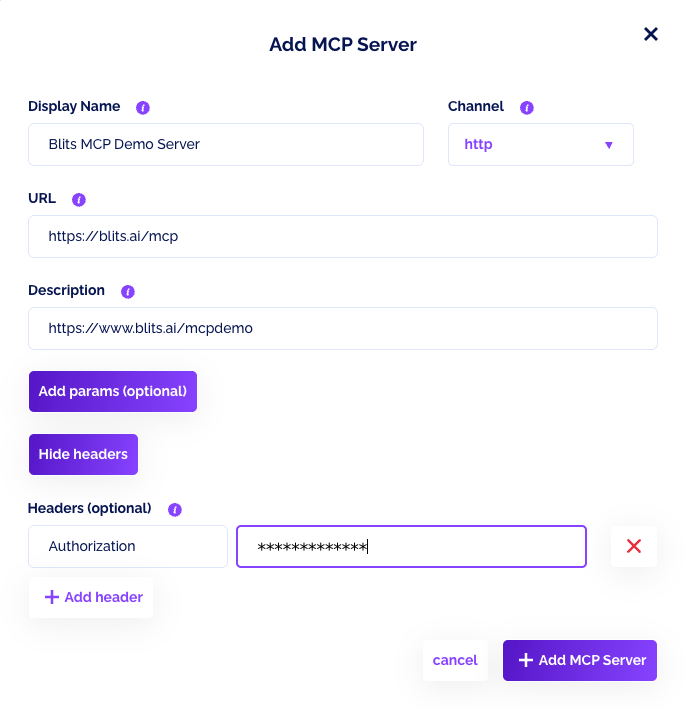
- Open your LLM in the admin panel and go to Your LLM tools.
- Scroll to MCP Servers and click Add new MCP Tool.
- Provide a display name, URL, and description.
- Choose the channel (
sse or http). - Optionally add headers and params if your MCP server needs authentication or default arguments.
Once saved, the MCP server is available to your LLM and can be toggled on or off. That's how we connect our own agents to external systems without hardcoded integrations, and how customers bring their own tool stacks into the Blits.ai platform.

Start small, with a few high impact tools such as search, a data lookup and your CRM. Spend more time on tool descriptions than you think you need: the model picks tools by reading them, and a vague description gets you a wrong pick. Least privilege, always. If a tool only needs to read orders, don't let it cancel them. Log every call, because tool usage belongs in your audit trail. Put timeouts and retries on everything, so a hanging tool doesn't take the conversation down with it. And test with realistic prompts (typos and half sentences included) to see how the model really selects and uses the tools.
We have a demo MCP server running at:
blits.ai/mcpdemo
We built it together with our partner 270degrees as a product experience: you customize a football shirt in real time. Simple, but it shows the idea. The LLM calls tools through MCP to change colors, names and options in a real UI. Want to see the code? Check the demo page.
MCP servers are the missing layer between "LLMs that can talk" and "LLMs that can do". Your tool integrations become portable, secrets and permissions stay under control, and adding the tenth tool is about as much work as adding the first. If you're building agents for real business use cases, I'd make MCP the foundation and build the rest on top of it.
Updated on 12 October 2026.